Green card photo requirements are among the most precisely specified elements of a USCIS application. Beyond Border is an immigration firm serving professionals pursuing employment-based green cards through EB-1A, EB-2 NIW, and related pathways. For any green card application, whether filed independently or through an immigration firm, the photo must meet every USCIS specification. A rejected photo delays the application until a compliant replacement is submitted. This guide covers every current USCIS requirement so applicants can prepare a compliant photo from the outset.
Book a consultation with Beyond Border for employment-based green card guidance
USCIS requires a colour photo taken within the last six months that meets precise size, format, background, and composition standards. Every specification is mandatory. Partial compliance does not satisfy the requirement.
The table below summarises the current USCIS green card photo specifications for 2026.
The head size requirement is the most commonly misunderstood specification. The measurement of 1 inch to 1 and 3/8 inches refers to the vertical distance from the bottom of the chin to the top of the crown of the head, not to the top of the hair. The face must occupy between 50% and 69% of the total image height.
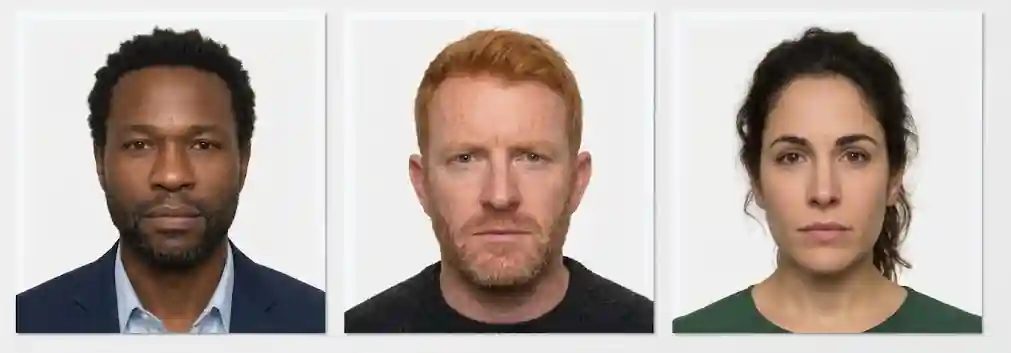
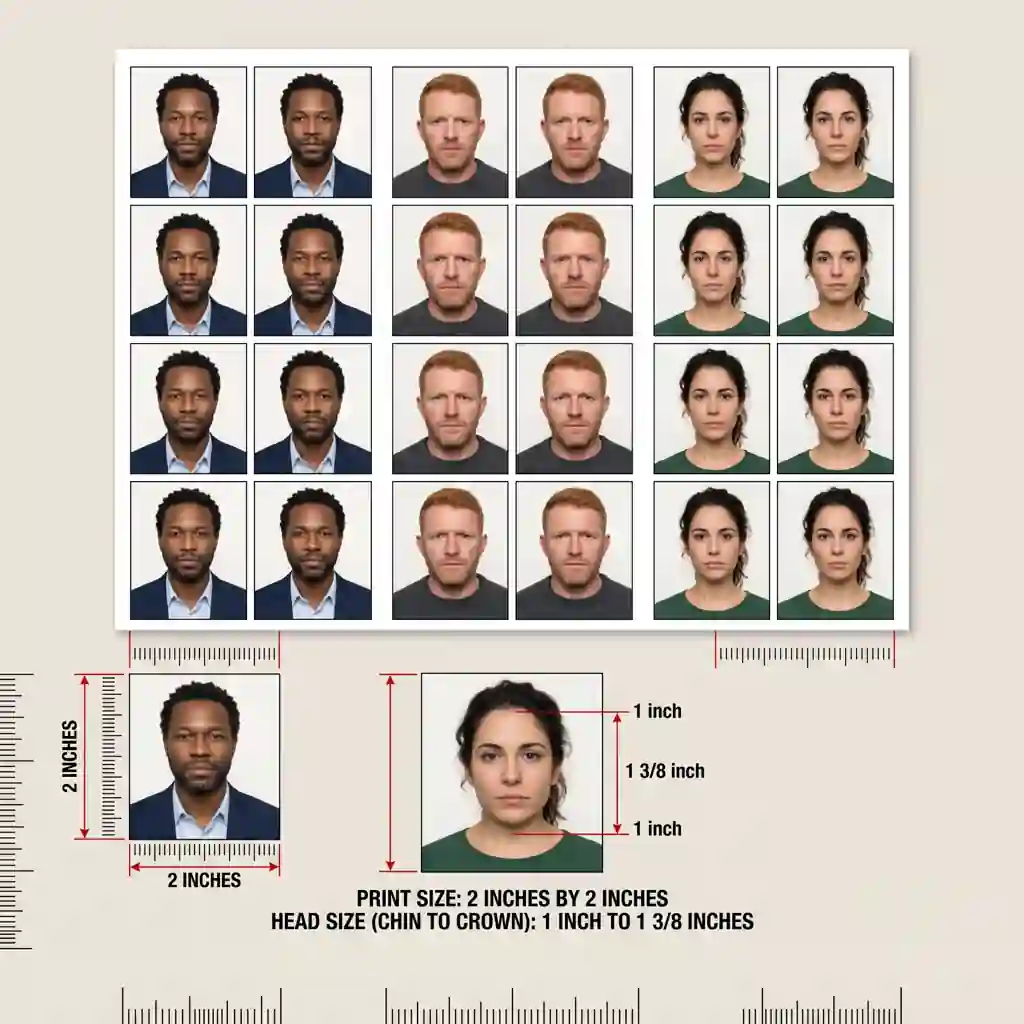
The size and most technical specifications are identical between USCIS green card photos and U.S. passport photos. Both require 2 by 2 inch prints with the same background and head position rules. However, USCIS applies stricter quality control at the review stage, and some elements that may pass a passport photo check will fail a USCIS photo check.
The most common differences in practice are as follows. Background shadows that are marginal enough to pass at a passport office counter are frequently rejected by USCIS automated and officer review. Older or faded prints that technically meet size requirements but lack the clarity USCIS expects for biometric matching are also rejected more often by USCIS than by passport offices.
For EAD (Employment Authorisation Document) and I-485 (adjustment of status) applications, the photo requirements are identical to the green card specifications listed above. Applicants filing multiple concurrent forms can use photos from the same session provided the photos remain within the six-month recency window at the time of submission.
USCIS photo rejections follow predictable patterns. The table below covers the most frequent rejection causes and how to prevent each one.
The Diversity Visa (DV) Lottery program imposes the same technical specifications as standard USCIS green card applications but applies automated digital scanning at the point of submission. Photos that fail the digital scan are rejected before a human officer reviews them, and the applicant has no opportunity to resubmit within the same lottery cycle.
The automated scan checks for correct file format, minimum resolution, head size within the required range, and background uniformity. Photos taken in professional studios using standard settings typically pass the scan reliably. Home-edited photos that have been cropped, resized, or compressed with image editing software frequently fail because the compression artefacts or scaling changes affect the pixel-level quality checks.
For DV Lottery submissions specifically, using a professional photo service or a USCIS-compliant online photo tool is strongly advisable rather than attempting to edit an existing photo to fit the specifications.
The most reliable way to produce a compliant green card photo is to use a professional photography studio or pharmacy photo service that explicitly offers USCIS-compliant immigration photos. Not all photo services understand the difference between passport photos and USCIS immigration photo standards. Confirming in advance that the service follows USCIS green card photo specifications avoids reprinting costs.
For applicants who take photos at home or upload digital photos through an online system, the following steps reduce rejection risk. Use a camera with sufficient resolution rather than a front-facing phone camera. Stand or sit against a flat white or off-white wall with no visible texture or pattern. Ensure even lighting with no overhead shadows falling on the face or background. Take the photo in a well-lit room with natural light or diffused artificial light, not direct flash which creates harsh shadows.
When using an online photo cropping tool, choose a tool specifically designed for USCIS immigration photos rather than a generic passport photo tool, as the head size requirements differ slightly. After cropping, check that the head measurement falls within the required range before printing.
Standard green cards are valid for 10 years and require renewal at expiry. Each renewal requires new photos that meet the current USCIS specifications at the time of the renewal application. Even if the applicant's appearance has changed minimally, new photos taken within six months of the renewal filing are required.
Conditional green cards issued to applicants in certain categories are valid for two years and also require new photos at the time of the removal of conditions filing. Applicants should not assume that photos used for the original application can be reused for subsequent filings unless they fall within the six-month recency window.
For employment-based green card applicants pursuing EB-1A or EB-2 NIW, the photo requirements apply at the I-485 adjustment of status filing stage once the priority date is current. Preparing compliant photos as part of the I-485 package preparation ensures this element does not create a last-minute delay.
Explore Beyond Border's EB-2 NIW visa page and EB-1 visa page for guidance on the I-485 filing process for employment-based green card applicants.
Beyond Border specialises exclusively in high-skilled U.S. employment-based immigration, with a 98% approval rate across 4,000+ cases and a client base spanning professionals from Salesforce, Google, Yelp, Chime, Visa, and Mastercard across both high-growth technology companies and established financial services firms.
Technically yes, if it was taken within the last six months and meets USCIS specifications. However, USCIS applies stricter quality review than passport offices, and photos with marginal backgrounds or lighting that passed the passport check frequently fail the USCIS photo review. Taking a dedicated photo for the green card application reduces this risk.
No. USCIS requires a neutral expression with the mouth closed. A slight or natural smile is also not acceptable. The face should be relaxed and expressionless for the photo.
USCIS issues a notice requesting a new compliant photo. The application processing pauses until the replacement photo is received and accepted. The delay can range from several weeks to months depending on how quickly the replacement is submitted and processed.
Yes. USCIS photo specifications for I-485 adjustment of status and I-765 Employment Authorisation Document applications are identical to the green card photo requirements. Applicants filing both forms concurrently can use photos from the same session.
Yes, if the headwear is worn daily as part of a religious practice. The headwear must not obscure any part of the face. Documentation of the religious requirement is advisable to include with the application to prevent questions during review.

Learn the complete USCIS green card photo requirements for 2026. Covers size, format, background, head position, digital specs, common rejection reasons, and how to pass the USCIS photo check for the first time.

Green card photo requirements are among the most precisely specified elements of a USCIS application. Beyond Border is an immigration firm serving professionals pursuing employment-based green cards through EB-1A, EB-2 NIW, and related pathways. For any green card application, whether filed independently or through an immigration firm, the photo must meet every USCIS specification. A rejected photo delays the application until a compliant replacement is submitted. This guide covers every current USCIS requirement so applicants can prepare a compliant photo from the outset.
Book a consultation with Beyond Border for employment-based green card guidance
USCIS requires a colour photo taken within the last six months that meets precise size, format, background, and composition standards. Every specification is mandatory. Partial compliance does not satisfy the requirement.
The table below summarises the current USCIS green card photo specifications for 2026.
The head size requirement is the most commonly misunderstood specification. The measurement of 1 inch to 1 and 3/8 inches refers to the vertical distance from the bottom of the chin to the top of the crown of the head, not to the top of the hair. The face must occupy between 50% and 69% of the total image height.

The size and most technical specifications are identical between USCIS green card photos and U.S. passport photos. Both require 2 by 2 inch prints with the same background and head position rules. However, USCIS applies stricter quality control at the review stage, and some elements that may pass a passport photo check will fail a USCIS photo check.
The most common differences in practice are as follows. Background shadows that are marginal enough to pass at a passport office counter are frequently rejected by USCIS automated and officer review. Older or faded prints that technically meet size requirements but lack the clarity USCIS expects for biometric matching are also rejected more often by USCIS than by passport offices.
For EAD (Employment Authorisation Document) and I-485 (adjustment of status) applications, the photo requirements are identical to the green card specifications listed above. Applicants filing multiple concurrent forms can use photos from the same session provided the photos remain within the six-month recency window at the time of submission.
USCIS photo rejections follow predictable patterns. The table below covers the most frequent rejection causes and how to prevent each one.
The Diversity Visa (DV) Lottery program imposes the same technical specifications as standard USCIS green card applications but applies automated digital scanning at the point of submission. Photos that fail the digital scan are rejected before a human officer reviews them, and the applicant has no opportunity to resubmit within the same lottery cycle.
The automated scan checks for correct file format, minimum resolution, head size within the required range, and background uniformity. Photos taken in professional studios using standard settings typically pass the scan reliably. Home-edited photos that have been cropped, resized, or compressed with image editing software frequently fail because the compression artefacts or scaling changes affect the pixel-level quality checks.
For DV Lottery submissions specifically, using a professional photo service or a USCIS-compliant online photo tool is strongly advisable rather than attempting to edit an existing photo to fit the specifications.
The most reliable way to produce a compliant green card photo is to use a professional photography studio or pharmacy photo service that explicitly offers USCIS-compliant immigration photos. Not all photo services understand the difference between passport photos and USCIS immigration photo standards. Confirming in advance that the service follows USCIS green card photo specifications avoids reprinting costs.
For applicants who take photos at home or upload digital photos through an online system, the following steps reduce rejection risk. Use a camera with sufficient resolution rather than a front-facing phone camera. Stand or sit against a flat white or off-white wall with no visible texture or pattern. Ensure even lighting with no overhead shadows falling on the face or background. Take the photo in a well-lit room with natural light or diffused artificial light, not direct flash which creates harsh shadows.
When using an online photo cropping tool, choose a tool specifically designed for USCIS immigration photos rather than a generic passport photo tool, as the head size requirements differ slightly. After cropping, check that the head measurement falls within the required range before printing.
Standard green cards are valid for 10 years and require renewal at expiry. Each renewal requires new photos that meet the current USCIS specifications at the time of the renewal application. Even if the applicant's appearance has changed minimally, new photos taken within six months of the renewal filing are required.
Conditional green cards issued to applicants in certain categories are valid for two years and also require new photos at the time of the removal of conditions filing. Applicants should not assume that photos used for the original application can be reused for subsequent filings unless they fall within the six-month recency window.
For employment-based green card applicants pursuing EB-1A or EB-2 NIW, the photo requirements apply at the I-485 adjustment of status filing stage once the priority date is current. Preparing compliant photos as part of the I-485 package preparation ensures this element does not create a last-minute delay.
Explore Beyond Border's EB-2 NIW visa page and EB-1 visa page for guidance on the I-485 filing process for employment-based green card applicants.
Beyond Border specialises exclusively in high-skilled U.S. employment-based immigration, with a 98% approval rate across 4,000+ cases and a client base spanning professionals from Salesforce, Google, Yelp, Chime, Visa, and Mastercard across both high-growth technology companies and established financial services firms.